
Whether you’re one state over or across the country, bank like usual at any member branch in the nationwide CO-OP™ network.
{openTab}
- Use member credit unions nationwide as if you were at your home branch
- Over 5,000 compatible branches
- Locations available in all 50 states
- Conduct a number of transactions at any member branch, including:
- Deposits
- Withdrawals
- Loan payments
- Make transfers between accounts
- Purchase money orders and official checks1
- And more
- Simply bring in the following materials:
- Your home credit union's name
- Your account number
- Valid government-issued photo identification (i.e. state driver's license or US passport)
Branch Locator
Use any of the following methods to find the CO-OP location nearest to you:
- Search online by ZIP code, address, or city
- Call 888 748-3266 to find a location or 888 837-6500 for live personal assistance
- Text a ZIP Code to 91989 to find nearby shared branch locations
- Download the free shared branch locator app for iPhone® or Android™
GeoVista Credit Union is part of the CO-OP Shared Branching Network. Starting May 1, 2025, CO-OP will implement IDCheck at all Shared Branch locations. This new security feature is designed to make your out-of-state banking experience more secure by adding an additional layer of protection on your account. As a guest member, you may be required to complete IDCheck verification before transacting on your account.
How does IDCheck work?
When you visit a Shared Branch, be sure to bring your smartphone and a government-issued ID. Here’s what to expect:
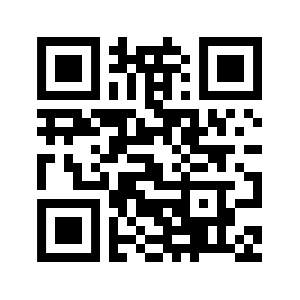
1. Scan the QR code displayed in the branch, to visit https://verify.coop.org.
2. Enter your credit union name, account number, and the last four digits of your SSN.
3. Scan your ID and take a selfie for verification.
4. Receive a 6-digit access code on your phone.
5. Show the code to the teller to complete your transaction.
For future visits, the process is even faster with your recognized devices—scan the QR code, enter your details, and get your access code instantly if your ID is valid and you’re using the same device.
Why IDCheck?
IDCheck ensures you can be positively identified at any Shared Branch location, reducing fraud while keeping transactions simple and efficient. This extra step adds security without adding hassle—just scan, verify, and do your banking with confidence.
When you arrive at the branch, or before, you will be asked to scan the below QR code with your mobile device and follow the instructions on the screen to get a member verification code. Check out the video below to learn more.
1May not be available at all outlets and locations.